
AUTHORIZATION
Blog

How to implement network segmentation safely in the office
One infected laptop must not give an attacker access to accounting, servers, production systems, and backups. That is exactly why the question of how to implement network segmentation in the office is not just a technical task. It is a management decision about how broadly one incident may affect the company’s operations.
In a small or medium-sized business, the network often grows gradually. A new wireless access point, printer, video surveillance camera, guest Wi-Fi, or cloud service connection is added. If these changes are not planned within a common architecture, all users and devices end up on one network. That is convenient in the short term, but it creates unnecessary risk, complicates incident investigation, and increases the likelihood of downtime.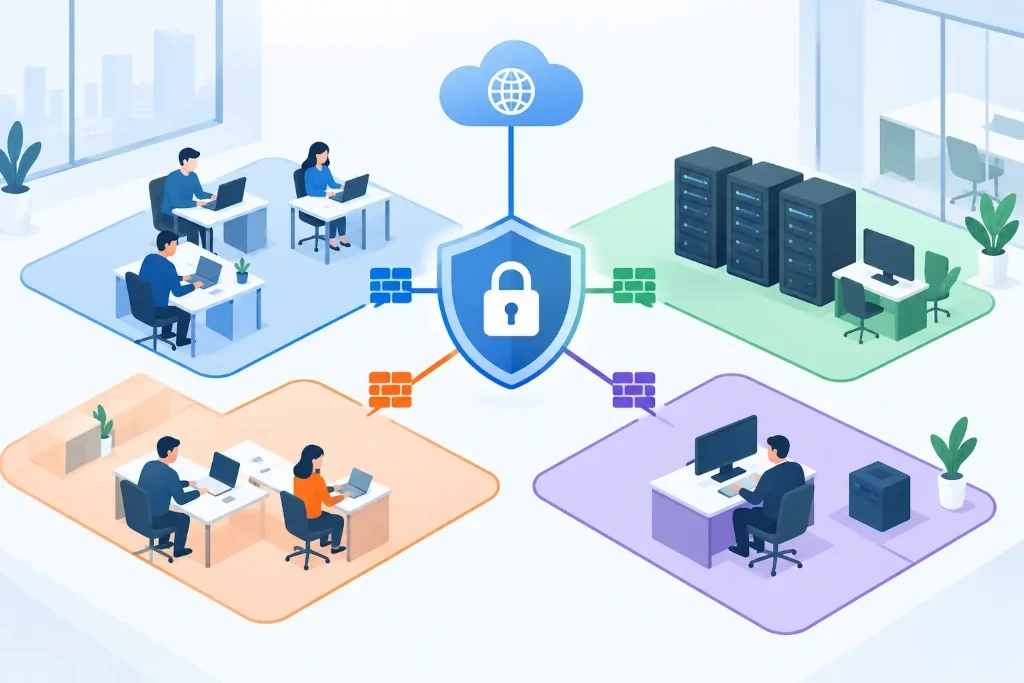
What segmentation changes in the company’s risk profile
Network segmentation divides infrastructure into separate logical zones. Each zone has its own purpose, access rules, and monitoring. Employee computers can communicate with the resources needed for work, while guest devices cannot see internal servers. Meanwhile, video surveillance, IoT devices, and printers are not treated as a trusted part of the environment of financial or personnel systems.
The most important benefit is incident containment. If ransomware reaches a user device or credentials are stolen, a properly separated network reduces the chance of moving to other systems. Segmentation does not stop every attack on its own, but it reduces the radius of impact and gives the IT team more time to respond.
It also improves day-to-day management. It becomes easier to see which devices are generating unusual traffic, where outdated protocols are being used, and what access is actually required. In audits, such a structure makes it easier to demonstrate that the company controls access to sensitive data and critical systems.
Start with business processes, not VLAN numbers
Technically, segmentation is often implemented with VLANs, routing rules, firewalls, and access control lists. However, a successful project starts with business functions, not configuration commands. Before defining network zones, you need to know where critical data is located, who uses it, and what communication is required for work processes.
Create a practical infrastructure map. It should include user computers, servers, cloud resource connections, wireless networks, printers, telephony, video surveillance, production or warehouse equipment, and remote access solutions. It is especially important to identify devices for which no one is still responsible, but which still have access to the network.
Then determine the priorities of data and processes. An accounting system, customer data, domain controllers, file servers, backup storage, and remote administration tools usually require stronger protection than a shared printer. But the segmentation model depends on the company’s operations. For a logistics company, the continuous operation of warehouse terminals may be critical, while for a professional services company, the confidentiality of client documents may be the priority.
Define trust zones
Most offices do not need dozens of complex segments in the first implementation phase. A sensible starting model separates at least the following four zones:
- employee work devices and the corporate wireless network;
- servers, identity services, and business applications;
- guest, personal, and temporarily connected devices;
- printers, telephony, cameras, and other IoT or operational devices.
Depending on the risk profile, the administration environment and backups should also be separated. These zones are frequent targets of attacks. An administrator workstation should not have the same level of access as an everyday email and web browsing computer. Likewise, the backup system must not be freely reachable from all user networks.
Develop access principles before technical configuration
Segmentation provides no value if full communication is allowed between all zones. Every connection must be justified by a specific work need. A practical core principle is this: block by default, allow when necessary.
For example, employee devices may need access to a file server, a print server, and specific cloud applications. A printer, in turn, has no need to initiate connections to employee computers or access the financial system. A guest network can use the internet, but it should not reach internal IP ranges. These rules should be recorded in a clear access matrix approved by both IT and the relevant process owners.
Compromises must also be made here. Rules that are too strict without testing can stop legitimate work, especially in systems with older integrations. On the other hand, overly broad exceptions gradually cancel out the purpose of segmentation. That is why every exception must be documented, with an owner and a regular review date.
How to implement network segmentation in the office in stages
The safest approach is to start with an infrastructure readiness check. You need to assess whether switches support VLANs, whether wireless access points can assign different SSIDs to separate zones, and whether the firewall has sufficient performance for inter-segment traffic processing. Outdated equipment may technically create VLANs but may not be able to maintain the required security policy, logs, or throughput.
The next step is a pilot project. Usually a good start is to completely separate guest Wi-Fi from the internal network and move IoT devices into a separate segment. This creates an immediate risk reduction with a relatively small impact on core processes. After that, servers, the administration environment, and separate user groups can be separated.
Before each change, there must be a rollback plan. This means documented current configuration, a change window, responsible persons, and clear tests after implementation. You should verify not only internet access, but also printing, telephony, VPN, remote work, authentication, accounting applications, and backup execution.
Changes should be made in a controlled manner, not by rebuilding the entire network in one evening. A gradual approach allows hidden dependencies to be discovered, such as a device using a fixed IP address or an application communicating with a server on a non-standard port. Such details often determine the real complexity of the project.
Segmentation must be maintained, not just installed
After implementation, the management phase begins. Firewall logs, network traffic monitoring, and alerts for unauthorized connections help identify errors and possible malicious activity. If a rule is triggered frequently, it should be determined whether it indicates a normal business need, a misconfiguration, or an attempt to bypass control.
At least once a year, as well as after major changes, the access matrix must be reviewed. If the company implements a new ERP system, moves services to the cloud, opens a branch, or acquires another company, the network architecture must be reassessed. Segmentation that was sufficient two years ago may no longer match the current risks.
Effective management also includes documentation: network diagrams, VLAN purposes, the IP plan, the rationale for firewall rules, and contact persons. This reduces dependence on a single specialist and speeds up recovery during an incident. In KSK IT practice, such transparent management is essential not only for security, but also to support external audits, insurance requirements, and business development decisions.
Network segmentation is not a project judged by the number of VLANs created. It is a discipline that determines who may access what, why it is needed, and how quickly the company can isolate a problem. Start with one clear boundary - for example, separating guest and internal networks - and build the rest of the architecture so that security does not hinder the company’s work, but helps it continue operating even during an incident.
